
Today, we are proud to announce native support for Amazon Web Services, the world's largest cloud provider.
AWS is inevitable for many startups and enterprises. It is where teams often begin building, and it remains part of their infrastructure as they grow across regions, accounts, and providers.
Supporting AWS properly was easily our biggest priority on our journey to making CostGraph the go-to platform for helping engineering and finance teams understand their infrastructure.
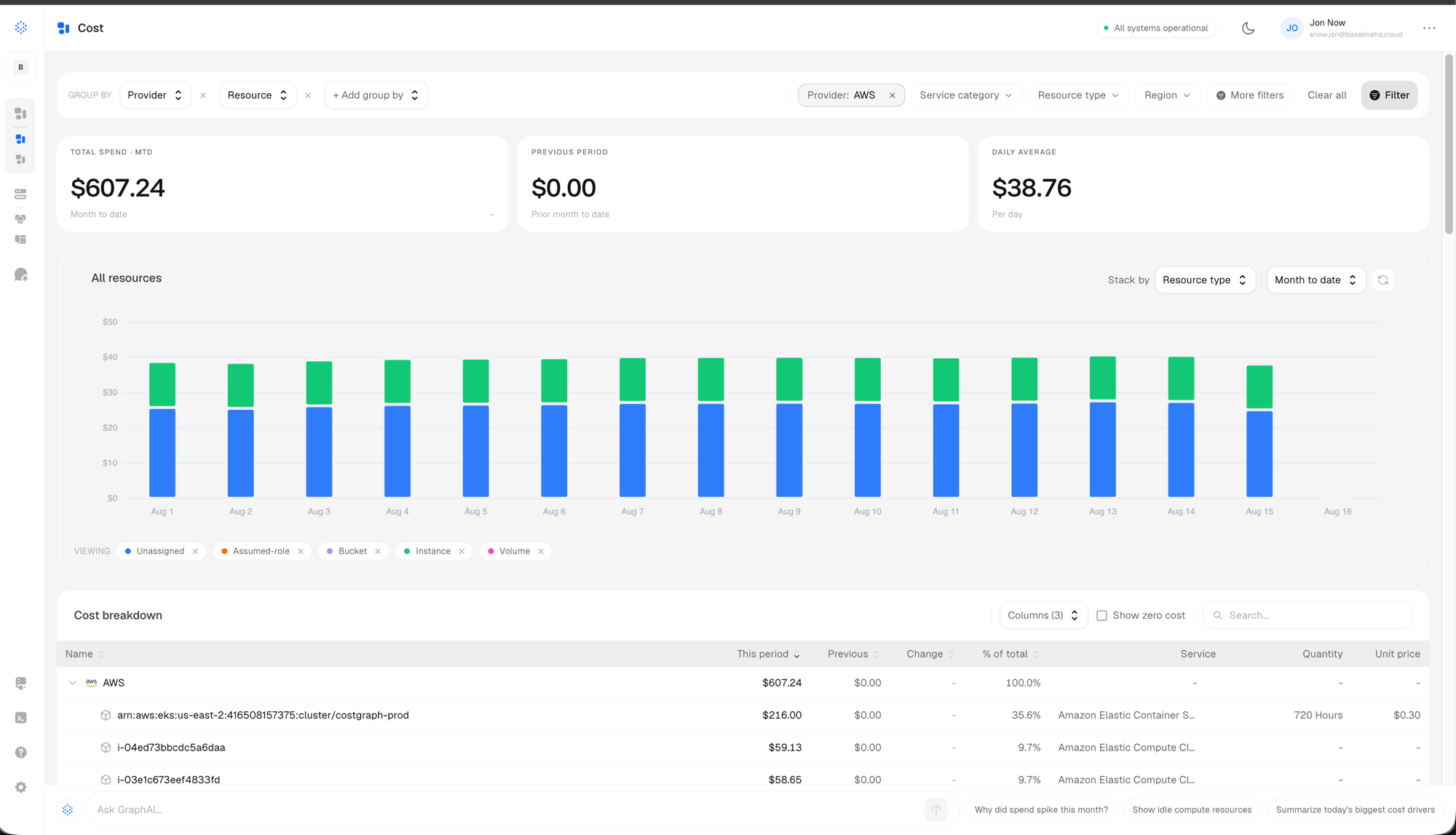
CostGraph ingests AWS cost and usage data, preserving billed cost, effective cost, usage, credits, Savings Plans, and Reserved Instance attribution.
AWS spend is normalized into the same cost model as every other provider in CostGraph. Teams can understand costs by account, service, resource, and tag without having to interpret different billing formats across their infrastructure.
CostGraph also reconciles allocated and unallocated costs against the monthly invoice. Costs that cannot be attributed directly to a resource, such as tax, shared charges, and some commitment costs, remain visible in an explicit unallocated bucket rather than disappearing from reports.
Beyond visibility
Understanding an AWS bill is only the first step.
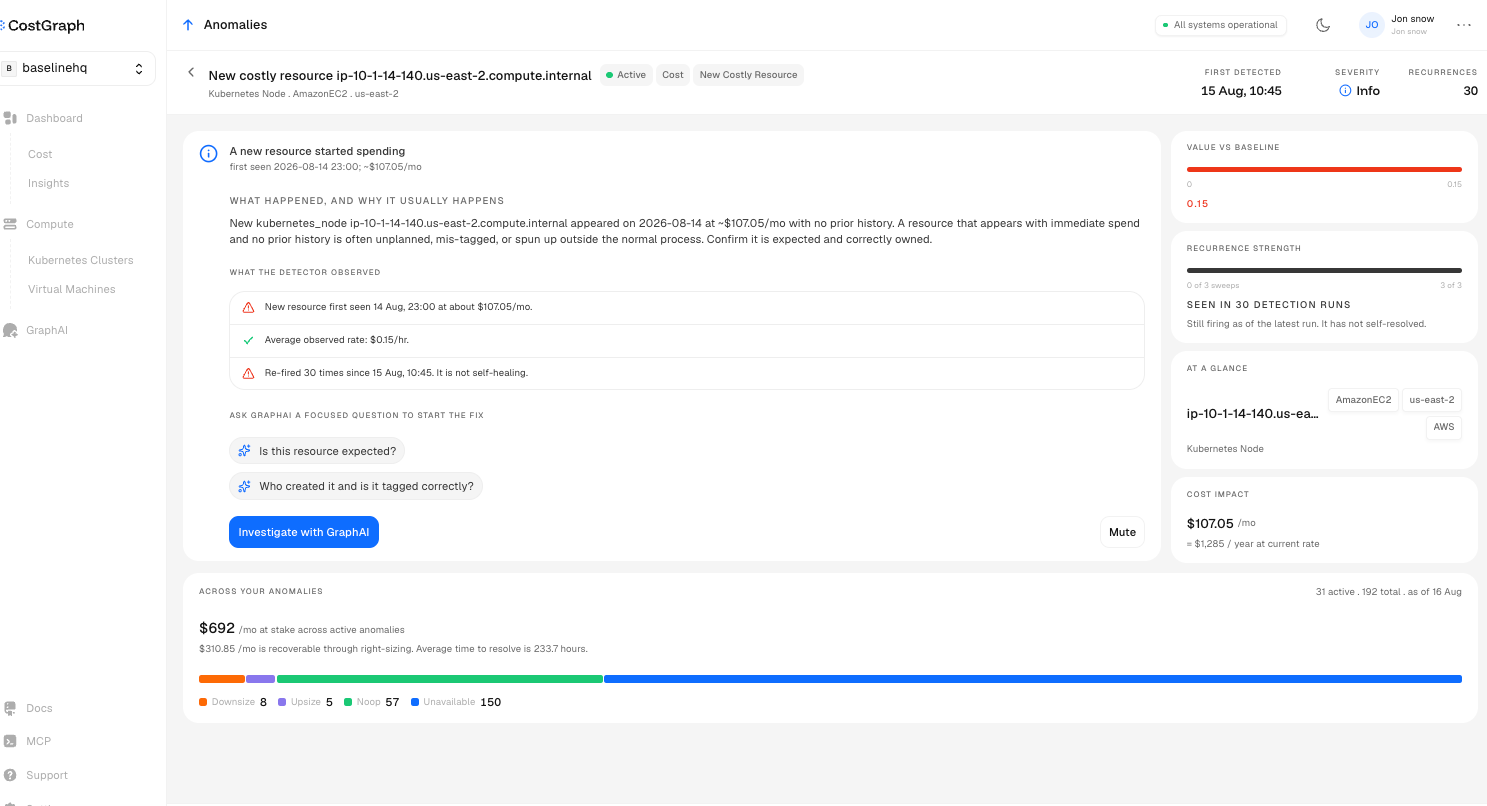
CostGraph combines normalized AWS cost data with resource context and usage metrics to identify idle resources, rightsizing opportunities, and safer alternatives.
Where sufficient data is available, CostGraph can also compare AWS resources with equivalent options from other supported cloud providers. Cross-cloud recommendations are only surfaced when they meet our savings, capacity, architecture, and location guardrails.
Recommendations include estimated monthly cost, potential savings, confidence, and the considerations a team should review before making a change.
Automated setup
CostGraph can create an export and its S3 destination on your behalf. Teams that prefer to manage billing infrastructure themselves can use Terraform instead.
After setup, CostGraph reads the Parquet export from S3 using a dedicated cross-account role.
AWS support is now available in CostGraph. If this sounds useful, get started for free or book a demo today.
Frequently Asked Questions
What is being launched?
CostGraph is launching deeper, first-class support for AWS cost, allocation, reconciliation, and optimization insights.
Customers can connect an AWS billing account and view its costs alongside Kubernetes, Google Cloud, PlanetScale, and other supported infrastructure providers.
How does the AWS integration work?
CostGraph reads AWS billing data from a FOCUS 1.2 Data Export delivered to an S3 bucket.
The export contains normalized cost and usage data in Parquet format. CostGraph ingests these files and maps them into the same canonical cost model used for other providers.
What is FOCUS?
FOCUS is the FinOps Open Cost and Usage Specification. It provides a common format for cost and usage data across cloud and infrastructure providers.
AWS FOCUS 1.2 includes billed and effective costs, usage, credits, resource metadata, and commitment information such as Savings Plans and Reserved Instances.
Using FOCUS allows CostGraph to compare and analyze AWS spend alongside costs from other providers without losing provider-specific billing details.
How is the AWS integration configured?
The recommended connection flow is automated.
CostGraph can create the AWS FOCUS 1.2 Data Export, configure its S3 destination, and establish the role required to read it.
Teams that prefer infrastructure as code can create the export, bucket, bucket policy, and read role using Terraform.
The AWS billing export is created in us-east-1, where AWS billing data is managed.
What AWS permissions does CostGraph require?
For automated setup, the provisioning role must allow CostGraph to configure AWS Billing and Cost Management Data Exports and the associated S3 bucket.
Ongoing ingestion uses a dedicated cross-account read role with:
- s3:GetObject on the export prefix
- s3:ListBucket on the export bucket
The connection flow provides the exact trust policy and external ID.
If you use the Terraform setup, CostGraph does not need permission to provision the export or bucket.
What AWS cost data is available?
CostGraph preserves the information available in the AWS FOCUS 1.2 export, including:
- Billed cost
- Effective cost
- Usage
- Credits
- Savings Plans
- Reserved Instances
- Billing accounts
- Services
- Resources
- Resource tags
This data can be analyzed alongside costs from other connected providers.
How are Savings Plans and Reserved Instances handled?
CostGraph preserves AWS commitment attribution from the FOCUS export.
This includes effective costs and the allocation of used and unused commitment charges, making it easier to understand whether committed capacity is delivering the expected savings.
How does cost allocation work?
CostGraph attributes AWS spend by billing account, resource, service, and tag when that information is available.
Costs that cannot be assigned directly to a resource are placed in an explicit unallocated bucket. This can include tax, shared charges, and commitment costs.
Allocated and unallocated costs are then reconciled against the AWS invoice for each billing account and month.
Does CostGraph provide AWS optimization recommendations?
Yes. CostGraph uses resource pricing and observed usage to produce rightsizing and idle-resource recommendations.
Where sufficient data is available, it can also compare AWS resources with equivalent options from other supported providers.
Cross-cloud recommendations must meet savings, capacity, architecture, and region-proximity requirements before they are shown.
How frequently does AWS cost data refresh?
CostGraph checks the connected S3 export for updated AWS billing data every hour.
AWS controls when new export files are generated and updated, so the availability of new billing data also depends on the AWS Data Export service.
How long does the initial AWS export take?
AWS states that the first Parquet files typically arrive within approximately 24 hours after the export is created.
CostGraph begins processing the data once those files become available.
How much historical AWS cost data is imported?
CostGraph checks for available AWS invoice data from the current calendar month and the previous calendar month.
A newly created AWS FOCUS export may not contain historical data automatically. Historical AWS export data may require a backfill request through AWS Support.