
Today, CostGraph is launching support for PlanetScale billing data. Customers can now view their PlanetScale database costs alongside their cloud, Kubernetes, and other infrastructure costs.
PlanetScale is often used alongside infrastructure running on AWS, Google Cloud. Our integration on CostGraph imports invoice line items and database metadata for your databases. Costs are normalized into the same model as other providers and can be viewed by database, plan, region, and billing metric.
Credits and discounts are also preserved, giving teams a view of what PlanetScale actually billed rather than an estimate.
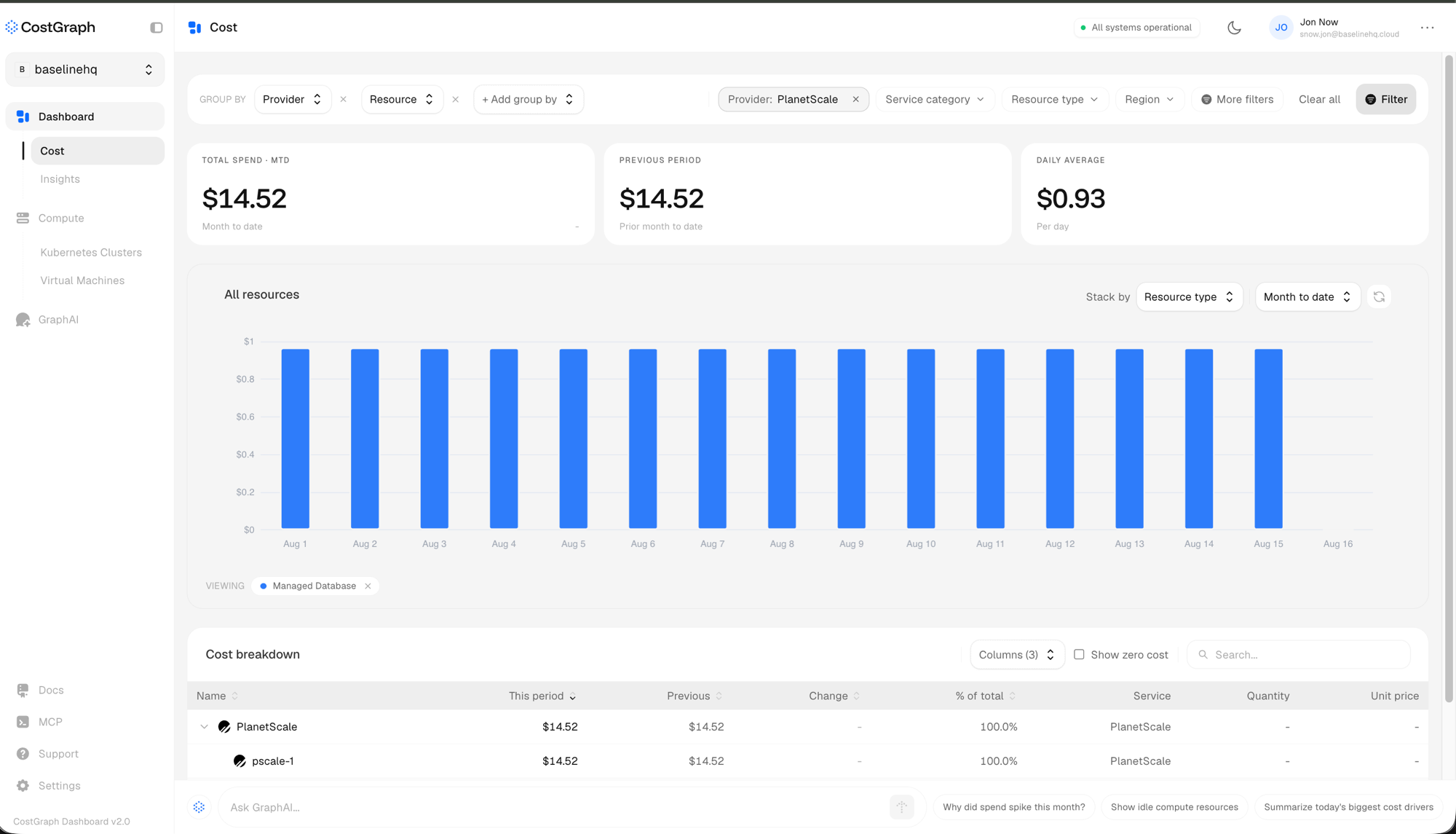
PlanetScale support is available on all CostGraph plans. To connect an account, open Settings -> Integrations, select PlanetScale, and provide a read-only service token.
Why are we doing this
Months of product iteration have led us to understanding that “Cloud spend” is not a straight line and most certainly doesn't rely solely on how much you pay for compute on AWS. Many teams rely on PlanetScale to power their applications, making it a portion of the bigger “How much did we spend” question.
If this sounds interesting, get started for free! or book a demo today
Frequently Asked Questions
What is being launched?
CostGraph now supports importing and visualizing PlanetScale billing data.
Customers can view PlanetScale costs alongside their cloud, Kubernetes, and other infrastructure costs within CostGraph.
Who can use the PlanetScale integration?
The PlanetScale integration is available to customers on all CostGraph plans. You do not pay if your database spend falls under $500. We charge 2% of spend for the databases you manage.
How does the integration work?
CostGraph connects to PlanetScale using an API service token. It imports invoice line items, database metadata, and metrics, then normalizes the billing data into the same cost model used for other infrastructure providers.
What permissions does CostGraph require?
The PlanetScale service token requires the following read-only permissions:
- read_databases
- read_organization
- read_invoices
- read_metrics_endpoints
CostGraph cannot modify your databases, branches, or PlanetScale configuration. It does not have access to database contents or connection strings.
What PlanetScale cost details are available?
PlanetScale costs include the associated organization, database, plan, region, and billing metric when that information is available.
This makes it possible to identify individual database costs and view them alongside the infrastructure supporting the rest of an application.
How frequently does PlanetScale cost data refresh?
CostGraph checks for updated PlanetScale cost data every hour.
PlanetScale provides costs as monthly invoice line items, so each charge is associated with its calendar-month billing period.
Does CostGraph provide optimization recommendations for PlanetScale?
Yes. CostGraph compares PlanetScale databases with right-sized managed database options from other supported cloud providers.
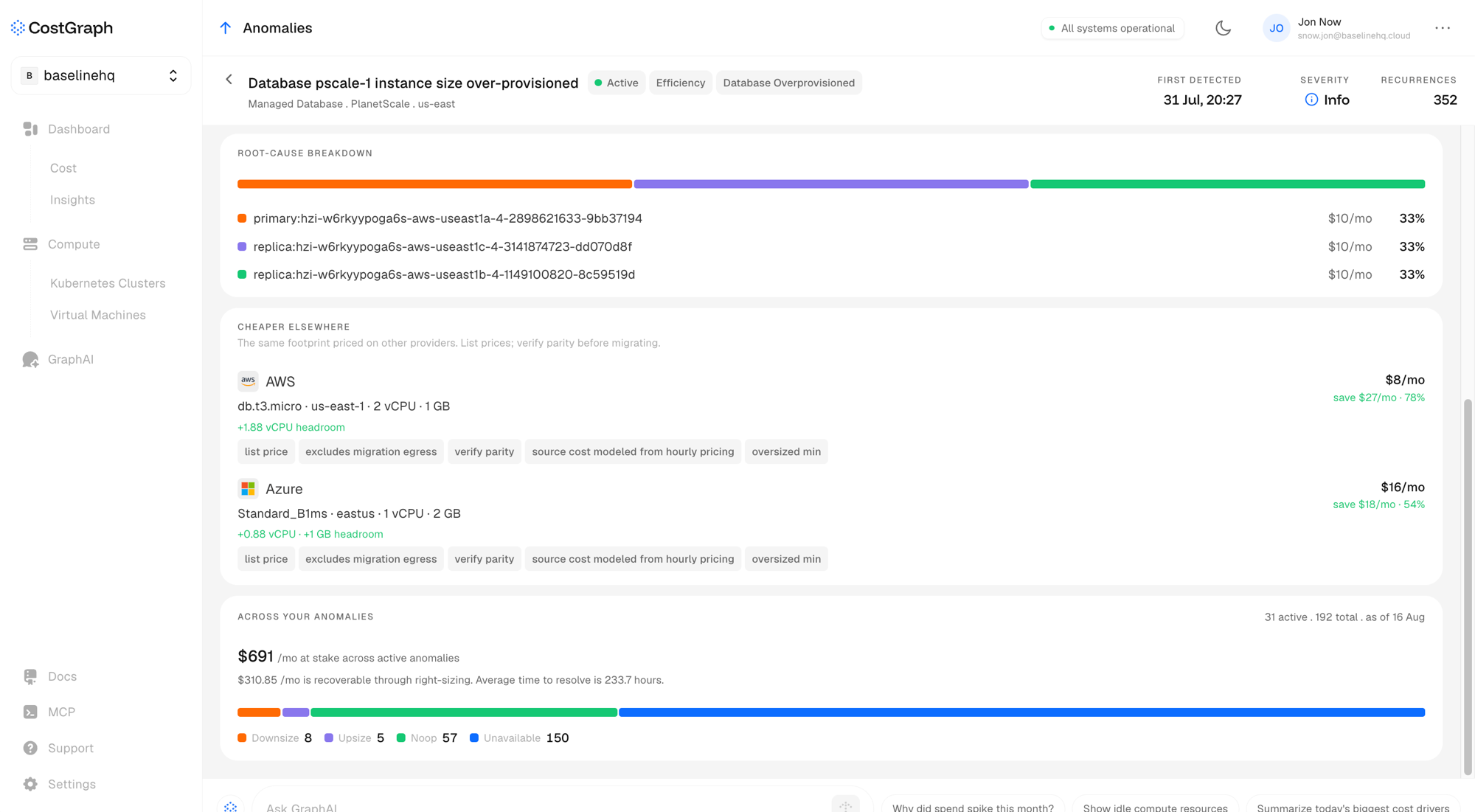
Recommendations include the estimated monthly cost, potential monthly savings, and percentage savings for each alternative. CostGraph also highlights important considerations such as list-price assumptions, migration egress, and the need to verify configuration and performance parity before migrating.
How much historical invoice data is imported?
When PlanetScale is first connected, CostGraph imports invoice data for the current calendar month and the previous calendar month.
After setup, CostGraph continues checking for updated cost data every hour.
How are credits and prorations handled?
Credits and prorations are preserved as separate negative-cost line items.
For example, if PlanetScale charges for a plan upfront and later credits the unused portion after a branch is deleted, CostGraph displays that credit separately using PlanetScale's original description.
What happens when a database has been deleted?
Historical charges are not dropped when their database can no longer be found in PlanetScale's current database list.
CostGraph still imports the line item and its cost. Metadata that is no longer available, such as the database's region or plan, is left empty.